01304 827609 info@use-ip.co.uk Find us

Hikvision vs Unifi

badayuni92

Active Member
Messages
49
Points
8
Hi

I’m currently running 4 x

Hikvision DS-2CD2387G3-LIS2UY/SL 8 MP Smart Hybrid Light with ColorVu Fixed Turret Network Camera​


I’ve been looking at the new Unifi G6 pro cameras. Which on paper have better specs such as a larger lens and optical zoom.

Does anyone know in reality how they compare to the hikvision 8mp cameras? I’m particularly interested in night time footage. I run my hik cameras with the colourvu light on all of the time when it’s dark enough. I believe this isn’t an option with Unifi, the light just comes on when smart events are triggered.

I’m certain the mobile app will be a lot better. The Unifi kit is also very expensive.

Does anyone have any real world experience in comparing both purely from a video quality point of view?

Thanks
 
Hi

I’m currently running 4 x

Hikvision DS-2CD2387G3-LIS2UY/SL 8 MP Smart Hybrid Light with ColorVu Fixed Turret Network Camera​


I’ve been looking at the new Unifi G6 pro cameras. Which on paper have better specs such as a larger lens and optical zoom.

Does anyone know in reality how they compare to the hikvision 8mp cameras? I’m particularly interested in night time footage. I run my hik cameras with the colourvu light on all of the time when it’s dark enough. I believe this isn’t an option with Unifi, the light just comes on when smart events are triggered.

I’m certain the mobile app will be a lot better. The Unifi kit is also very expensive.

Does anyone have any real world experience in comparing both purely from a video quality point of view?

Thanks
I've not used them, though I have considered them a few times. It's only the most recent G6 Pro models that have gone to the larger 1/1.2" sensor. As for the 'optical zoom' they're just a motorised varifocal lens as you can get on some Hikvision models.

The app (Protect) looks fairly basic from what I've seen. I have one of my cameras connected via ONVIF. As you mention Unifi is relatively expensive and the system is fairly restrictive. Currently if you want to add cameras via ONVIF you lose all events, not just AcuSense, you can't even use basic motion detection. Of course you can add an AI port to get that capability but they're the price of another camera. Want to connect their NVR to a monitor? There's another £200 for a Viewport.

You need a Unifi NVR to run Protect or one of their routers. I already use the UDR so I can use that for a camera. That would probably be a good starting point to try a camera rather than going all in.

There are plenty of reviews on YouTube. InsideWire, Crosstalk Solutions and DPC Technology (there's only so much I can take of Clay Archers voice)
 
@JB1970

Thanks for the reply as always. I need add another camera that covers my front door. I’m thinking to go for the one of the new varifocal 8mp colourvu cameras. I think the turret versions are coming soon.

Instead of that do I call all in with Unifi. Do you know if the app is good in terms of notifications etc? Live view
 
Instead of that do I call all in with Unifi. Do you know if the app is good in terms of notifications etc? Live view
I literally get nothing other than live view and basic playback - no notifications are possible as events aren't supported from ONVIF cameras without an AI Port. Live View/Playback are the same - you click on the camera to view it live, to view playback you scroll back through the timeline on the same page (high speed scrubbing works unlike Hik-Connect). I can select a specific date directly but not a time. It's a very basic app.
 
I literally get nothing other than live view and basic playback - no notifications are possible as events aren't supported from ONVIF cameras without an AI Port. Live View/Playback are the same - you click on the camera to view it live, to view playback you scroll back through the timeline on the same page (high speed scrubbing works unlike Hik-Connect). I can select a specific date directly but not a time. It's a very basic app.
I guess that explains why I can’t find many videos at all online that demonstrate the app. They all focus on the controller which is accessed via a laptop or similar.

Sounds like the app is very basic even if everything is connected to a cloud key / Unifi nvr.

The hik connect for all its shortcoming it still gives you what you need to a point. It just isn’t very slick, but it’s perfectly workable I guess.

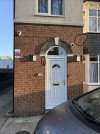
If you don’t mind I’ve attached a pic of my current camera set up at the front door. The low down camera on the right I had intended for it to focus on the front door. In reality it’s too high and probably the wrong focal lens im therefore mostly getting tops of heads. Or an image in one specific part in relation to the front door.

I’m thinking to change this per the picture attached and put the cameras where the circles are. Do you think it will work?

For the front door Im planning to go with a DS-2CD2H87G3-LIZS2UY (Black) which I think is a 8mp colour vu motorised varifocal black camera.

And for the top right another 2.8mm 8mp colurvu to match the one on the left

I think varifocal will work well for the front door so I can dial in the focal to exactly what I need.

Thanks.
 

Attachments

  • IMG_5048.jpeg
    IMG_5048.jpeg
    1.8 MB · Views: 7
I guess that explains why I can’t find many videos at all online that demonstrate the app. They all focus on the controller which is accessed via a laptop or similar.

Sounds like the app is very basic even if everything is connected to a cloud key / Unifi nvr.

The hik connect for all its shortcoming it still gives you what you need to a point. It just isn’t very slick, but it’s perfectly workable I guess.

If you don’t mind I’ve attached a pic of my current camera set up at the front door. The low down camera on the right I had intended for it to focus on the front door. In reality it’s too high and probably the wrong focal lens im therefore mostly getting tops of heads. Or an image in one specific part in relation to the front door.

I’m thinking to change this per the picture attached and put the cameras where the circles are. Do you think it will work?

For the front door Im planning to go with a DS-2CD2H87G3-LIZS2UY (Black) which I think is a 8mp colour vu motorised varifocal black camera.

And for the top right another 2.8mm 8mp colurvu to match the one on the left

I think varifocal will work well for the front door so I can dial in the focal to exactly what I need.

Thanks.
When you're so close to the front door you shouldn't need a vari-focal; it's the one time I'd usually use a 2.8mm over a 4mm.

One thing regarding your installation...If you're mounting directly to brickwork like you have there, remove and throw away the big ugly compression gland from the bottom, replacing it with the blank that's in the back of the box. If you then mount the box so that it's over a horizontal mortar line, it's usually concave enough for the CAT5E to pass behind the box without squishing it. If not you can just scrape a little mortar out under the box - it looks neater.
 
@JB1970

Thanks a lot as always for the advice. Yes il do that. I’m in the process of getting it redone.

Regarding the front door camera where I have it now it’s a 2.8mm and people see far away. That was my thinking for going varifocal.

I also plan to lower it so I capture faces as people come on tk my property
 
@JB1970

Thanks a lot as always for the advice. Yes il do that. I’m in the process of getting it redone.

Regarding the front door camera where I have it now it’s a 2.8mm and people see far away. That was my thinking for going varifocal.

I also plan to lower it so I capture faces as people come on tk my property
I meant to say with the current 2.8mm people seem far away. To get good detail you have to zoom in but because it’s digital zoom the quality gets lost
 
I meant to say with the current 2.8mm people seem far away.
That's just lens perspective. Wide angle lenses will make objects appear smaller and more distant to one another whereas a narrower angle will compress that perspective. If you're installing a camera and want to see a person fully when stood at your door you need a 2.8mm lens. The side effect is that they'll look tiny at the edge of the driveway. There's nothing you can do about that. If you get a varifocal, you'll probably end up using it fully wide so it'll be a waste.
 
That's just lens perspective. Wide angle lenses will make objects appear smaller and more distant to one another whereas a narrower angle will compress that perspective. If you're installing a camera and want to see a person fully when stood at your door you need a 2.8mm lens. The side effect is that they'll look tiny at the edge of the driveway. There's nothing you can do about that. If you get a varifocal, you'll probably end up using it fully wide so it'll be a waste.
Nice one @JB1970

2.8mm is what I’ll go for then.

I plan to have 2 cameras high up that will give me a full view of the drive.

In terms of a front door camera, how high do you recommend mounting them? I’m not that bothered if it could be tampered with. Should that happen I’ve got the other 2 cameras watching
 
2.8mm is what I’ll go for then.
2.8mm is what you'll likely need for the front door if you're wanting to see someone stood at the door.
I plan to have 2 cameras high up that will give me a full view of the drive.
Those wouldn't need to be 2.8mm. A 4mm gives a 95 degree horizontal field of view so will capture everything. Perhaps consider a vari-focal there if you're wanting to see something larger in view (at the expense of 'a full view'). A wide view you're going to capture everything but it's going to look small. A narrow view you're going to see things larger but you're not going to see it all (decide what you need)
In terms of a front door camera, how high do you recommend mounting them?
Wherever suits, probably about 8'. You don't want the camera to be looking straight out without any tilt. If you get the sky in view you'll have times of day when glare will cause issues indoor image. You may be restricted by the position of your lights as they could cause glare if they're in the cameras view.
 
Back
Top